Our Mitsubishi mini-splits in Home Assistant for $15 per head
Every Mitsubishi head reporting real state to Home Assistant locally through the CN105 port, about $15 per head, no cloud.
We have a boiler system with radiators in our home but also have 9 Mitsubishi mini-splits connected to two Hyper-Heat outdoor units (one feeds 5 heads and the other feeds 4). All of these heads operated on their own. As you may or may not know, a multi-zone outdoor unit will only operate in one mode at a time, whichever head calls for heat or cool first “wins” and sets the mode for the entire unit. So if one head is cooling on one outdoor unit, another head connected to that same unit can’t heat, and vice versa. This meant that if we wanted to quickly cool a room, we had to walk around the house and figure out which head was running so that we could turn it off to get the conditioning that we needed at the time. The scheduling functionality on the stock remotes was all time based and not very intuitive.
We wanted to be able to automate the units, control them from our phones, set up zones, rules, automations, and eventually use the boiler as second stage heat when needed in the colder months. As of this week, we have all 9 heads reporting their real state to Home Assistant locally for about $15 per head, with no cloud involved. Being able to set a zone temperature and have the system figure out the coordination for us is what we’re going for.
Expensive, flaky, or nothing at all
I only had Airzone Cloud on one head (the 3rd floor guest bedroom) the previous owners installed. It was ugly (an external control box needs to be installed on every head), really finicky (random Wi-Fi dropouts) and the unit was about $200 which meant if I wanted to run them on all the units it would have been $2,000+ total.
I ended up running some Broadlink RM4 mini IR devices (about $25 each) in a couple rooms that I needed remote control of (a kid’s room and our master bedroom) as a stopgap until I could find the time to work out a longer term solution. These little devices are great for what they are (the ability to learn IR and a database of codes built in) and made remote control of the Mitsubishi heads quick to onboard. They were of course stateless.. just like the standard Mitsu remotes (they don’t sync with the units, they only have the state of the last commands they sent). The other six heads I had no remote control of at all.
The CN105 port, hiding in plain sight
I ended up doing some research and found out about the internal serial port (CN105) on the Mitsubishi boards. This is the port that Airzone and other hardware integrations plug into. I also discovered some open source projects based around the ESP32 that talk to this port. This was starting to feel like the Navien RS-485 work I did recently.
There’s a lot of open source work built around this port. These are the options I looked at:
- SwiCago/HeatPump, the Arduino library many others build on
- gysmo38/mitsubishi2MQTT, ESP firmware that talks MQTT
- geoffdavis/esphome-mitsubishiheatpump, ESPHome component on SwiCago’s library
- echavet/MitsubishiCN105ESPHome, ESPHome component and the one I cloned and modified
- Serin Labs, a ready-made controller if you’d rather not flash anything
$15 per head, no soldering iron
I went with the trusty M5Stack AtomS3 Lite I used in the Navien project coupled with a custom cable made by a company called Serin Labs out of New Jersey which made the entire project solderless and plug and play. The Atom draws its power from the CN105 port itself so there’s nothing else to wire up. Total price ended up being $7.50 for the Atom and $7.50 for the cable!
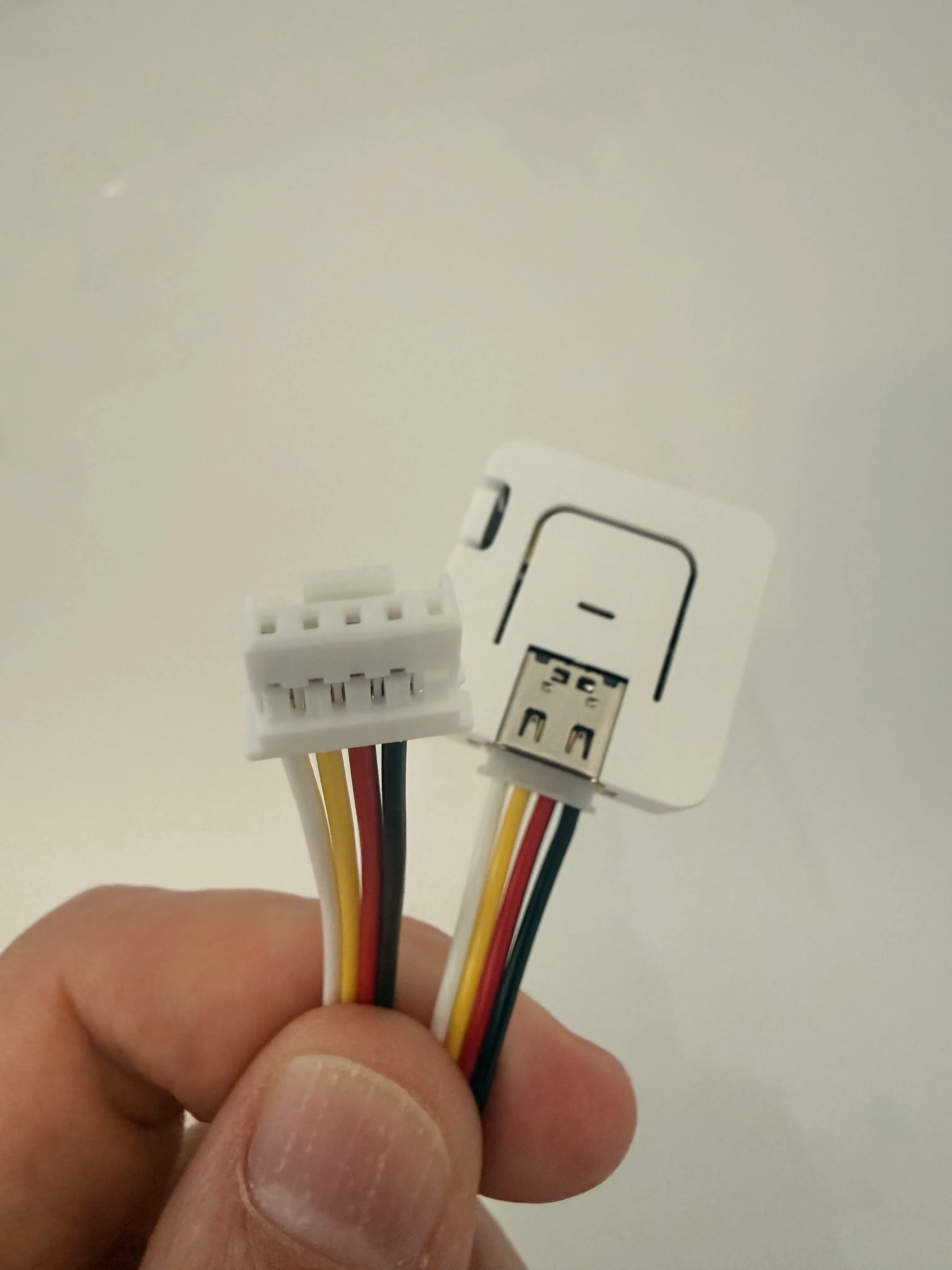
Each head gets its own Atom on the CN105 port running ESPHome and all nine talk to Home Assistant over Wi-Fi.
Two days, nine heads
The install procedure was pretty smooth, I worked in Claude Code on the firmware (cloned from echavet’s project with some of my own modifications) and then it was just a matter of going to each head (9 total, all MSZ-GL units) over the course of Oct 1 and 2, taking the cover off (dusting and cleaning while I was up there), bench flashing each Atom on my laptop over USB, reserving its address on the router, installing it in the head, adopting it in Home Assistant, and making sure Wi-Fi was strong and data was flowing.
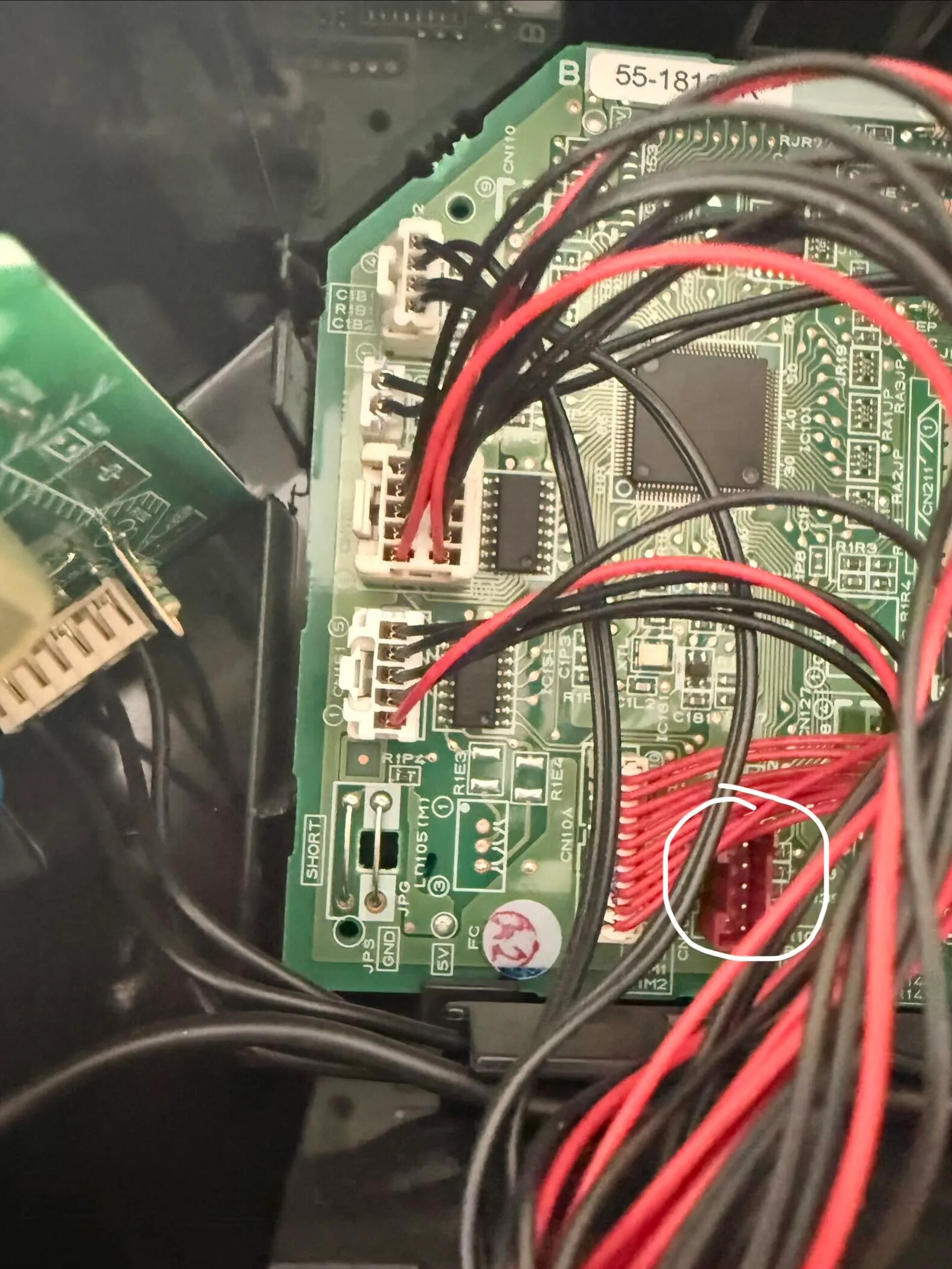
A couple spots needed extra attention. The GL24’s CN105 port hides behind the right corner box (the service manual shows where). The closet head grabbed a weak access point at -82 dBm so I pinned it to a stronger one and moved the Atom inside the housing, which brought frame loss from 15% down to 3.6%. Once all nine were reporting I retired the old Airzone Cloud and SmartIR integrations in Home Assistant.
Three sessions, one job
The work split across multiple Claude Code sessions. Claude Code has a feature where open sessions can coordinate and communicate with each other over an internal socket, so the Home Assistant session could ask the home-infra session for an address reservation without me copying anything between them. I had a cn105-mitsubishi session which was dedicated to flashing and firmware for the Atom devices, I had one session in my home-infra project which manages my Flint 2 router with Ansible (for the address reservations), and another session which was dedicated to my Home Assistant configuration. This separation of duties keeps the context clean in each session and allows for very dedicated sessions to specific projects, with all of the project’s rules and conventions loaded and in place where needed. I wrote about how I keep the rules and context around in Memento and running a bunch of sessions at once is a whole ’nother post.
Next up in this series: the quest for better telemetry out of the heads, a thermostat by a doorway, the coordinator (where you set a zone temp and the system figures it out), and the boiler as second stage heat. And since there’s now an ESP32 in every head, I’m also looking at using the Atoms as Bluetooth proxies for room-level presence in Home Assistant with Bermuda.