A comfort range per room instead of a single number
Every room now shows its comfort range and can run heat-only or cool-only, and the coordinator asks me when two rooms fight over one outdoor unit.
When I started, each room had a single number, and that felt sufficient for a few weeks. The coordinator from part 6 keeps every room close to its setpoint, choosing heat or cool for each outdoor unit. But I was only seeing the number on the dashboard, so I couldn’t see how much slack there was before a room would request anything.. a room that was idle mid-range looked exactly the same as one about to claim its compressor.
The setpoint is still the target, and Auto still aims for it. But now I can see the surrounding range on every room, and configure it per room. Zero means use the house default of ±2 °F, or a room can opt into its own band. I set one room to ±3 as an experiment. I’m curious to see if a wider band will mean fewer claims on outdoor units, without the occupants even noticing.
The new per-room switches (allow heat, allow cool) let me restrict Auto’s choices for a room. They rank below the outdoor unit’s season, but above the weather gate, so they narrow the room’s choices without ever overriding the unit. For example, the guest room previously had no way to stop cooling except to turn it off, which also stopped heating. Now I can set heat-only Auto, which keeps guests comfortable.
A card you can’t bump
I built a room card to put at the top of the coordinator’s dashboard, to show the range and expose the switches. I followed Home Assistant’s custom cards guide. The setpoint is in a row with its range next to it, and the current activity in the room. The set-once settings are hidden behind a More settings link, off the main row.
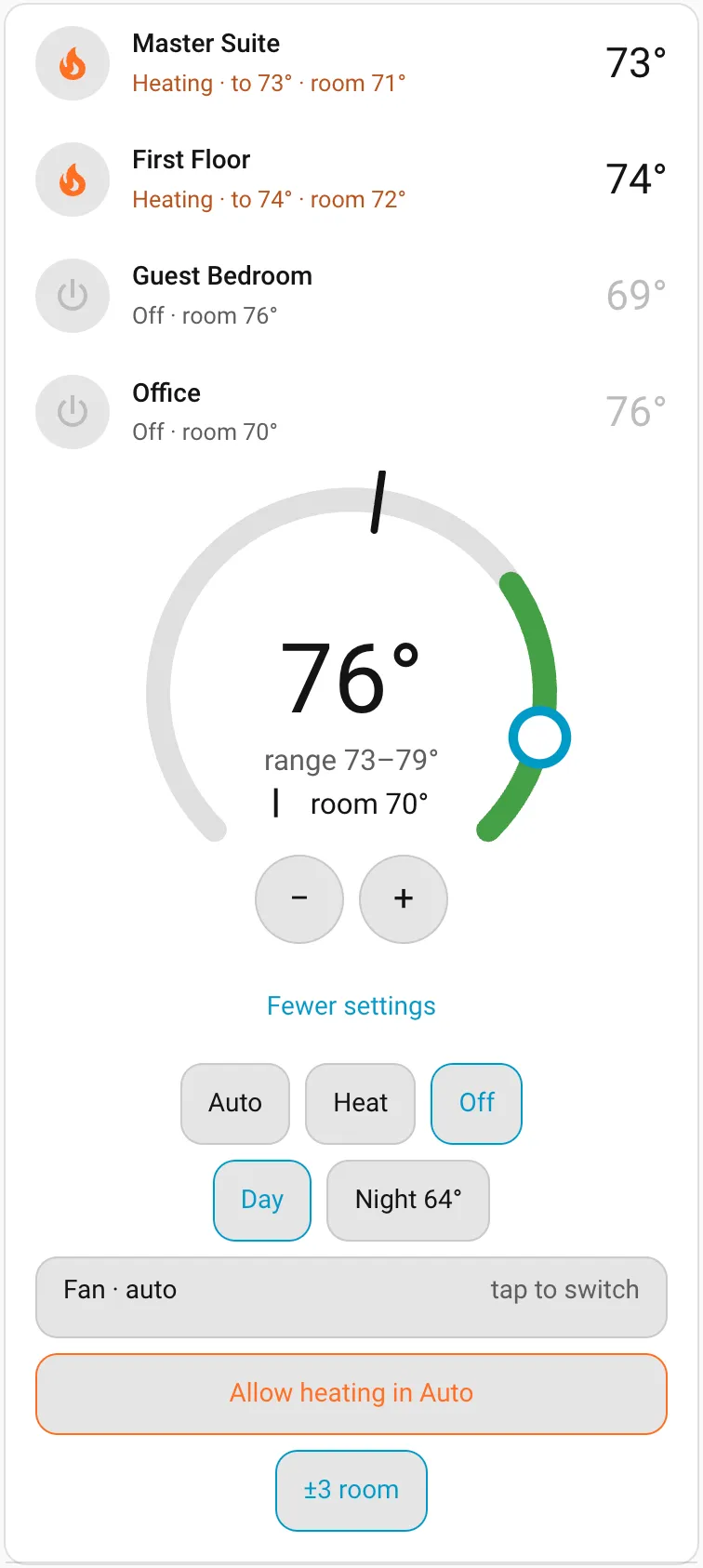
The dial only moves when dragging the handle. This rule came out of a review by a second model of the design: “a scrolling thumb must never change a room.” On a phone, having the dial react to any touch makes every scroll of the dashboard a potential setpoint change. I hadn’t thought of that until the review gave it a name. Moving the rest behind a More settings link is the same idea, just with fewer live controls so there are fewer things for the thumb to hit.
The other surprise was the boot order. The Home Assistant frontend replaces its custom element registry as part of its startup sequence, so any card loaded as extra JavaScript needs to wait for the main app element to exist before defining itself. If it defines itself too early, it ends up in a registry that’s about to be replaced. So now the card waits for the app to exist first.
When two rooms want one outdoor unit
The last piece is a case the coordinator can’t resolve on its own. If two rooms connected to the same outdoor unit want to run in opposite modes, one of them has to wait. The climate integration doesn’t have a concept of a room waiting for the compressor to become available, so the coordinator tracks that. When a room has been parked behind another room on the same unit for 30 minutes, the coordinator sends one push per episode with three buttons: give the unit to the waiting room, turn the waiting room off, or leave things as they are.
I haven’t done a live dry run of this push yet, so that’s next on my list. I’ll trigger a real contention episode, press all three buttons, and verify that they do what they say they do. Then I’ll wait a few weeks for data from the wider-band room. Does ±3 really relieve pressure on the outdoor unit, or does it just let the room drift farther before requesting?