Reliability & operations · Build log
VictoriaMetrics as the first metrics database on my home server
I added VictoriaMetrics as the first metrics database on my home server, and within a day it was scraping exporters, feeding dashboards, and paging my phone with alerts.
At home, I already had logs and traces flowing through Grafana Alloy to Loki and Tempo, but I had nowhere to put numbers. I couldn’t see when a CPU was getting hot or a container was stuck in a restart loop. I had no metrics being stored, so I couldn’t set up alerts. So I added VictoriaMetrics as the first metrics database on my server, and within a day it was feeding my dashboards and paging my phone. Beszel was left with nothing to do.
The gap first surfaced in my own app when wiring up observability for the vault search service: I was using Alloy to send logs to Loki and traces to Tempo, but dropping OTLP metrics because I had nowhere to put them. So the latency and lag numbers were stuck in log lines as fields. Grafana alerts on lag or request rate were out of reach until I had a metrics database. The Loki+Grafana side had been running for a while, see e.g. AdGuard Home and the query-log shipper, but Beszel was an island: a hub with zero agents, monitoring nothing.
The main thing I wanted from metrics was alerting. This is a small form factor box with limited cooling, so CPU temperature was the first thing I wanted on my phone. But then there’s memory, disk space, services that quietly stopped working.
I chose VictoriaMetrics over a full Prometheus server after comparing the two with Claude Code. VictoriaMetrics comes as a single small binary, uses little RAM, is Prometheus-compatible (so Grafana can query it with PromQL, and all exporters and community dashboards work without changes), and does a good job at compressing the data. I never considered Mimir because I’m running on a single machine at this scale.
I scoped this as a full metrics pillar, but didn’t write a spec. One of the key design choices was: who collects the data? Alloy is carrying all server logs, and I didn’t want to add any new mounts or config to that one container. So I decided to have VictoriaMetrics pull the data by scraping each exporter’s /metrics endpoint from its own scrape file. This keeps Alloy responsible for logs and traces only, so that a fault in the metrics system doesn’t bring down logs.
This pull model feels appropriate in a homelab context to me: almost all open-source services provide a Prometheus /metrics endpoint, but almost none support pushing OTLP data. This is a point the VictoriaMetrics blog makes when comparing OpenTelemetry and Prometheus. I’m still using Grafana Alloy for traces and logs, but metrics bypass it.
I added it as an extra container in my existing observability stack, rather than a new stack. It’s deployed from git using Dockhand, like everything else on the server (see Self-hosted git with Forgejo and why some repos never touch GitHub for the git side). I set the retention to 12 months with the single-node server’s -retentionPeriod flag, and configured it to read targets from a file using -promscrape.config. I put the data directory on a path that’s already backed up by my nightly Backrest job, so no new backup is needed.
  victoriametrics:
    image: victoriametrics/victoria-metrics:v1.144.0
    container_name: victoriametrics
    restart: unless-stopped
    network_mode: host
    volumes:
      - /storage/containers/victoriametrics:/victoria-metrics-data
      - ./victoriametrics/scrape.yml:/etc/vm/scrape.yml:ro
    command:
      - "-storageDataPath=/victoria-metrics-data"
      - "-retentionPeriod=12"
      - "-httpListenAddr=:<port>"
      - "-promscrape.config=/etc/vm/scrape.yml"
I set a 30-second scrape interval for everything in the scrape file, and added a header comment explaining why I chose this approach so anyone reading it next will know why Alloy isn’t involved. In Grafana, I set up a Prometheus-type datasource with a pinned id so the provisioned dashboards can refer to a stable name.
# VictoriaMetrics native scrape config (-promscrape.config). VM scrapes the
# exporters directly so Alloy (the log/trace pipeline) stays untouched.
global:
  scrape_interval: 30s
  external_labels:
    host: <host>

scrape_configs:
  - job_name: victoriametrics
    static_configs:
      - targets: ['localhost:<port>']
  - job_name: node
    static_configs:
      - targets: ['localhost:<port>']
  - job_name: cadvisor
    static_configs:
      - targets: ['localhost:<port>']
  # Observability-stack app metrics (self-monitoring the pillars). Only endpoints
  # verified live (HTTP 200 /metrics) are listed. Added 2026-06-05.
  - job_name: loki
  - job_name: tempo
  - job_name: grafana
  - job_name: alloy
My initial targets beyond the self-scrape were node-exporter for the host (CPU, memory, disk, network, temperature from /proc and /sys) and cAdvisor for per-container usage. I tuned cAdvisor down a bit since the box runs warm.. Docker containers only, every 30 seconds, skipping a bunch of metric groups. All targets came up the first night, and I added two community dashboards: Node Exporter Full and cAdvisor.
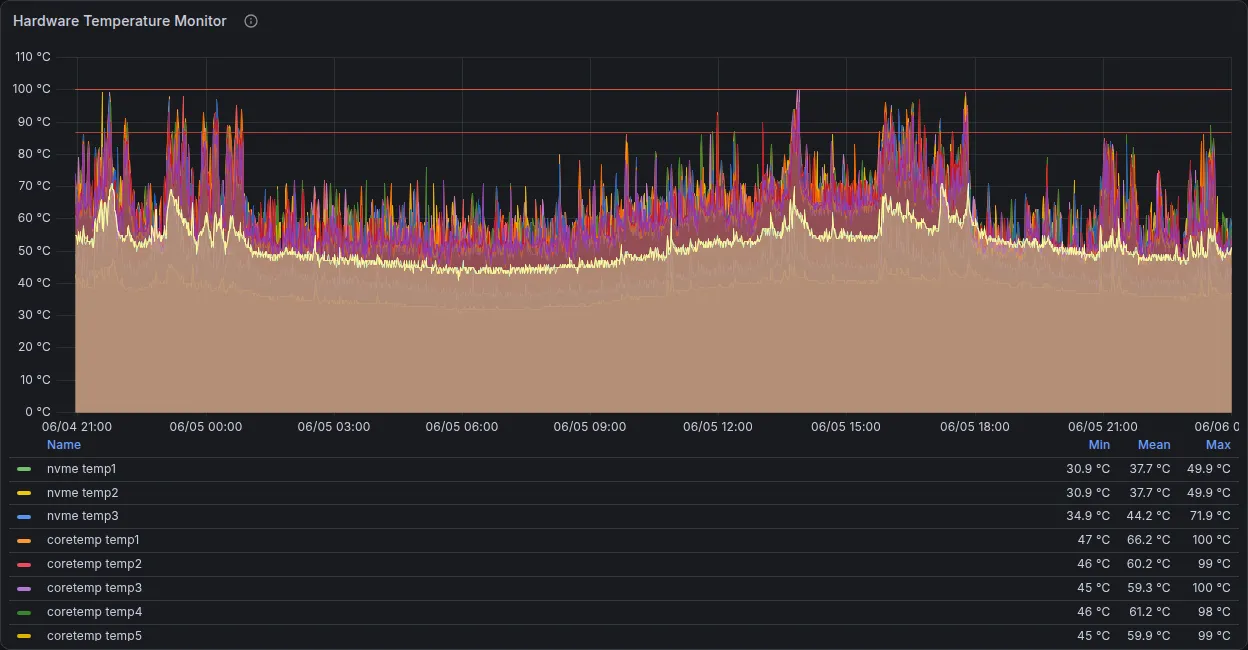
The next day I added the /metrics endpoints for Loki, Tempo, Grafana, and Alloy so the stack is monitoring itself. That brings us to seven total targets, all of which are up. I didn’t include Dockhand (the metrics path redirects) or Forgejo (metrics are off and 404) since they don’t provide a usable endpoint.
Alerting to my phone
This is the whole point, so I put these rules in right away. The temperature rule fires if the hottest core goes over 95 °C for five minutes. Memory is 92% for ten minutes. Disk is 90% for fifteen minutes. Then there are meta rules for a scrape target down for five minutes and container restarts over five in fifteen minutes.
But firing doesn’t mean paging! Initially, my rules hit the Grafana default contact point, so they fired but I didn’t get anything. I set up two Pushover contact points, one for critical alerts with high priority and a siren sound, and verified they were getting through.
The disk rule deliberately excludes RAM filesystems like tmpfs, because their usage doesn’t tell us anything about disks. But the same day /tmp (a 4 GB tmpfs) filled to 100% and broke some tooling with ENOSPC, and the disk rule didn’t catch it. So I added a sixth rule, just for /tmp, firing if it’s above 80% for ten minutes.
Warning · tmpfs escapes the disk rule
The disk rule specifically excludes RAM filesystems like tmpfs, but I had a case where /tmp (a 4 GB tmpfs) filled up to 100% and broke tooling with ENOSPC, so I have a sixth rule that fires if /tmp is above 80% for ten minutes.
A few gotchas
- cAdvisor’s newest GitHub release (v0.57.0) doesn’t have a published container image.. the GitHub release tags and image tags are different. I pinned v0.55.1, the newest image that actually exists.
- The VictoriaMetrics and node-exporter images don’t ship with curl, so a compose healthcheck won’t work and would leave them marked unhealthy for the autoheal sweep that watches every container. Uptime Kuma monitors them from outside instead, with alerts going to Pushover.
- Community dashboards reference a
${DS_PROMETHEUS}input that file provisioning doesn’t fill in. I swapped it for the pinned datasource id and stripped the__inputsblock.
node-exporter (for the host) and cAdvisor (for containers) made Beszel redundant, so I removed it from the server with the monitor and dashboard tiles. I kept the data directory in case I ever want to go back.
This means I have metrics alongside logs and traces in Grafana. A new watch target is just one scrape job in a file owned solely by VictoriaMetrics. Next up: Metrics and logs from the network gear where I’m scraping the network gear in the same way.