Reliability & operations · Build log
Samba for Time Machine: what broke under a green dashboard
My first Samba deploy for Time Machine came up green in Dockhand while several things were silently broken underneath.
The Samba container was healthy in Dockhand when I first deployed it, but it refused to login. I’m using it to do Mac Time Machine backups over the network to ZFS datasets on my home server, plus two more shares for file offloading and a 106 GB cold archive. I’d never had SMB on this server before, neither on the host nor in any container. I chose the ServerContainers/samba image because it includes vfs_fruit, a Samba module that makes the share behave the way macOS expects.
That green deploy hid five separate problems, none of which Dockhand told me about because it only said the container had started and its healthcheck was passing.
- No user account.. every login was refused, but listing the shares as a guest still worked.
- The hardening was silently ignored.. the shares had no host gate at all.
- The healthcheck was green the whole time.
- My home VPN clients were turned away.
- Time Machine refused the destination.. no backup could even start.
Luckily nothing was lost because nothing was backed up yet and it was a brand-new service with no data. Also, the server doesn’t have a WAN interface, so the ungated shares were only accessible from inside the house and on the tailnet. No alert caught any of these, and I had to find them all myself by checking the running container or on my Mac (not the deploy status).
Minutes, a day and a loud error
These three surfaced within minutes on the evening of June 16 because I went straight to the running container and didn’t trust the status. The refused login exposed the missing account, and testparm -s in the container shows the config Samba is actually loaded, which didn’t include hosts allow. The nagging question was: if login is impossible, how could the healthcheck have been passing all along?
The VPN lockout sat until the next day, only discovered by asking if home VPN clients were allowed (they weren’t). The fix then hit a deploy that reported no success and never recreated the container (a Forgejo push webhook raced my forced deploy). Caught it by reading hosts allow back from the running container, then forcing deploy again. The last one, Time Machine error -1013, happened at Mac setup, but unlike the others it failed loudly.
Why they broke
Two of the five were from the image’s config format. It only takes env vars SAMBA_GLOBAL_CONFIG_* (global) and SAMBA_VOLUME_CONFIG_* (shares), which the entrypoint translates to smb.conf. Pre-creating a group with GROUP_<user> made busybox adduser fail “uid ‘1000’ in use”, so no account was ever created and valid users denied everyone. The second trap was global keys: the entrypoint only translates _SPACE_ to space and _COLON_ to colon. hosts_allow ended up in smb.conf as an unrecognized parameter, which Samba silently ignored along with the rest of the hardening I’d written the same way.
Tip · Check what Samba loaded
testparm -s in the container shows the config Samba actually loaded.
The healthcheck was wrong: smbclient -L lists shares and passes even without an account (guest fallback). The VPN lockout was a routing issue: my router was routing the AWG and OpenVPN subnets without masquerade, so Samba saw the real client source addresses and hosts deny = ALL blocked them (only LAN + tailnet allowed). The Time Machine error was just tmutil syntax mistakes: I’d forgotten the user name in the URL and put -p after the URL instead of before, so tmutil setdestination kept returning -1013 “No password/user”.
Two stack choices look like causes but aren’t. I publish the port on all interfaces.. binding to the specific Tailscale IP crash-loops on reboot if tailscaled hasn’t assigned the address before Docker starts the container. The gate is Samba’s hosts allow (no WAN side anyway). Bonjour discovery is off because matter-server already owns mDNS on the box, so I set the destination manually, which is more reliable than Bonjour even if it worked.
    ports:
      # NOT bound to specific IPs on purpose. A specific Tailscale-IP
      # bind crash-loops on reboot if tailscaled hasn't assigned
      # the IP before Docker starts this restart:unless-stopped container. Exposure is
      # gated at the SMB layer instead: `hosts allow` permits only LAN + tailnet +
      # loopback. The server has no WAN interface (behind the router's NAT).
    environment:
      # discovery off (mount by IP; mDNS port <port> owned by matter-server)
      - AVAHI_DISABLE=1
      - WSDD2_DISABLE=1
Fixing all five
I stopped pre-creating the group to fix the account issue. It turns out busybox adduser creates a primary group with the same name itself, and the pre-existing group caused the “uid in use” failure. I kept force user and force group on the shares so files still end up owned by uid/gid 1000.
# first deploy: pre-creating the group made busybox adduser fail ("uid in use"), so no account existed
      - ACCOUNT_<user>=${SMB_PASSWORD}
      - UID_<user>=1000
      - GROUP_<user>=1000          # group <user> gid 1000 (shares also `force group`)

# fix: let adduser make the same-name primary group itself
      # NB: do NOT pre-create GROUP_<user> - busybox adduser makes the user's
      # same-name primary group itself; a pre-existing one fails as "uid in use".
      - ACCOUNT_<user>=${SMB_PASSWORD}
      - UID_<user>=1000
For hardening, I rewrote all six global keys in entrypoint’s spelling, _SPACE_ where smb.conf has a space. Aside from the host gate, I enabled mandatory signing and set SMB2_10 as the minimum protocol. After redeploy, testparm -s showed all in the effective smb.conf, including hosts deny = ALL behind the allowed ranges.
# first deploy: a bare "_" stays literal, so Samba never saw "hosts allow"
      - "SAMBA_GLOBAL_CONFIG_hosts_allow=<lan-subnet> <tailnet-range> 127.0.0.1"
      - "SAMBA_GLOBAL_CONFIG_server_signing=mandatory"

# fix: the entrypoint only converts _SPACE_ -> space and _COLON_ -> colon
      - "SAMBA_GLOBAL_CONFIG_hosts_SPACE_allow=<lan-subnet> <tailnet-range> 127.0.0.1"
      - "SAMBA_GLOBAL_CONFIG_hosts_SPACE_deny=ALL"
      - "SAMBA_GLOBAL_CONFIG_server_SPACE_min_SPACE_protocol=SMB2_10"
      - "SAMBA_GLOBAL_CONFIG_server_SPACE_signing=mandatory"
      - "SAMBA_GLOBAL_CONFIG_load_SPACE_printers=no"
      - "SAMBA_GLOBAL_CONFIG_disable_SPACE_spoolss=yes"
The new healthcheck does a tree-connect to a real share and lists it, so it needs a real account. I smoke-tested that first: exit 0 for valid credentials, exit 1 for invalid. Only then did I add the autoheal=true label, so there was no restart from an unproven check.
# first deploy: passes via guest listing even when no account exists
      test: ["CMD-SHELL", "smbclient -L 127.0.0.1 -U <user>%$$ACCOUNT_<user> -m SMB3 >/dev/null 2>&1 || exit 1"]

# fix: connect to a real share and list it; autoheal turned on only after this was proven
      test: ["CMD-SHELL", "smbclient //127.0.0.1/<share> -U <user>%$$ACCOUNT_<user> -m SMB3 -c ls >/dev/null 2>&1 || exit 1"]
    labels:
      - "autoheal=true"
I added both subnets to hosts allow (IPv4 only, my choice) and forced a deploy again. I read the running config to confirm the new line was there. I found the working Mac command: sudo tmutil setdestination with -ap before the URL and the user name baked into the smb:// URL.
Tip · Time Machine destination syntax
sudo tmutil setdestination takes -ap before the URL. The user name goes in the smb:// URL. Otherwise tmutil setdestination returns -1013 “No password/user”.
      # LAN + home VPNs (AWG, OpenVPN - routed, NOT masqueraded by the router,
      # so the server sees the original VPN-subnet source) +
      # Tailnet (CGNAT, gated by Tailscale ACLs) + loopback.
      - "SAMBA_GLOBAL_CONFIG_hosts_SPACE_allow=<lan-subnet> <vpn-subnet-1> <vpn-subnet-2> <tailnet-range> 127.0.0.1"
The Time Machine share is just one environment variable full of raw smb.conf, with the entrypoint script turning each “; “ into a newline. That’s why the vfs_fruit settings are on the share instead of the global section. I pinned the image by digest and set up the stack to deploy on push to my own git server, as described in Self-hosted git with Forgejo and why some repos never touch GitHub.
; one env var, raw smb.conf; the entrypoint turns "; " into newlines
[<share>]
path = /shares/<share>
valid users = <user>
force user = <user>
force group = <user>
guest ok = no
read only = no
browseable = yes
vfs objects = catia fruit streams_xattr
fruit:metadata = stream
fruit:posix_rename = yes
fruit:nfs_aces = no
fruit:time machine = yes
fruit:time machine max size = 1T
First full backup
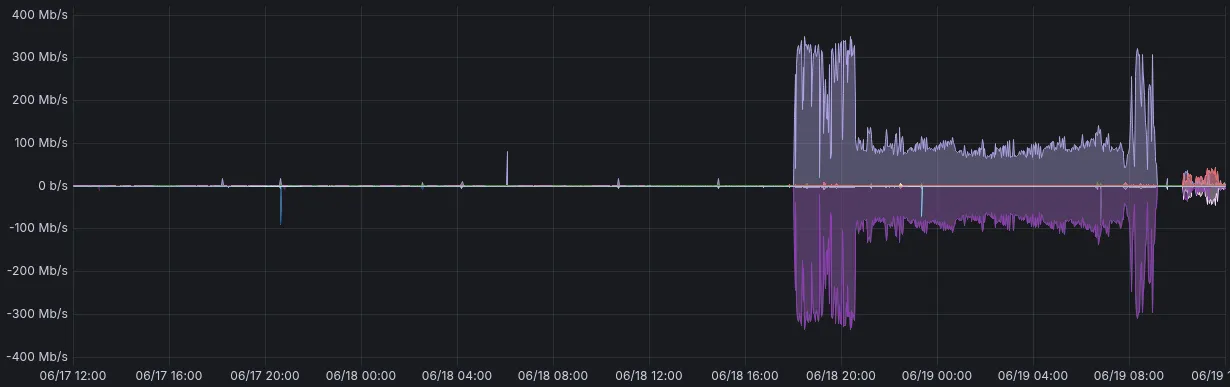
The Mac authenticated over SMB 3.1.1 with AES encryption, all three shares mounted. I wrote a .DS_Store file on each to confirm read-write. The first full backup started at 4 GB, I watched it grow, and it finished at 655 GB on the morning of June 19. Felt good after that rough first evening. The next incremental added 4 GB, and it’s been doing hourly backups since. To force one, I just run tmutil startbackup.. the --auto lets the system decide when.
What stuck
I kept the habit of verifying the effective config of the thing I’m running (testparm -s in the container, plus a tree-connect write test to prove the files actually land as 1000:1000) instead of just assuming the deploy worked. Same instinct as with my cloud architect habits at home.. the second rule was to prove the healthcheck before letting anything act on it (autoheal only got flipped on after the smoke test passed).
It’s now monitored by a Uptime Kuma TCP monitor (SMB doesn’t do HTTP).. if the container fails, autoheal restarts it and alerts me via apprise → Pushover. The offload and archive shares are in my nightly Backrest plan, and the Time Machine share is intentionally excluded (you don’t back up a backup). FileBrowser is still the web view for the same storage, but Samba gives me the native mount and Time Machine path.
One thing I still need to figure out is.. I set a 1 TB quota on the Time Machine share, and the Mac has ~829 GiB on it. For now, only a shallow history of older backups will fit until I bump that quota.