Reliability & operations · Build log
Photos: iCloud is a sync service, not a backup
I pulled my 60,058 iCloud photos onto my own server as two copies built to fail differently, one append-only and one an exact mirror.
All my photos are in iCloud, but as we all should know well.. that isn’t a backup. iCloud is a sync service, so deletions replicate. If I delete a photo on one device, it’s gone everywhere. That’s how it’s supposed to work. But it means that if my account gets compromised, my billing lapses, or something happens on Apple’s side, all my copies can be lost at once. It’s really just one copy. I need a copy outside Apple’s reach that can’t be deleted by an upstream deletion. That’s the photo component of My backup strategy.
What does a copy I own look like? Two copies, built to fail in different ways. Copy one is a plain-file export with osxphotos. It writes regular .jpg/.heic files to a year/month folder tree, with XMP sidecars next to each one. It’s grow-only: if I delete a photo in iCloud, it stays in the archive. That archive gets shipped offsite to Backblaze B2 with the server’s other backups.
Copy 2 is an exact mirror of the Photos library bundle, for full-fidelity library restore. It mirrors deletions, so it’s protected by local snapshots (via sanoid). The two copies have opposite failure modes, and what keeps them apart is the mirror only deletes if that night’s export succeeded. (I missed that gate in the first build: it could have emptied the mirror from the wrong library in the same run that added nothing to the archive.) The fixed version is short:
# BUT --delete is gated on the export having succeeded. A failed export is the
# signal that something upstream is wrong (wrong library path, unmounted SD
# card, half-migrated library), and mirroring deletions from a wrong library
# would empty this copy in the same run that failed to add to the other.
DELETE_FLAG=""; [ "$RUN_OK" = "1" ] && DELETE_FLAG="--delete"
rsync -a $DELETE_FLAG --partial --timeout=600 \
  -e "ssh $SSH_OPTS" \
  "${PHOTOS_USER}@${PHOTOS_HOST}:${LIBRARY_PATH}" "$BUNDLE_DST"
rc=$?
# 24 = "source file vanished", routine on a library that is being written to.
[ "$rc" -eq 0 ] || [ "$rc" -eq 24 ] && BUNDLE_OK=1
# Either copy failing fails the unit
[ "$RUN_OK" = "1" ] && [ "$BUNDLE_OK" = "1" ] || exit 1
Extracting originals requires a Mac, since they’re only accessible through a local Photos library (no server-side API for originals). My summer research favored icloudpd on a Linux server (no Mac required), but I ultimately chose osxphotos on an always-on Mac (with icloudpd as a fallback) because maintaining the fragile two-factor dance was just too much. The Mac setup is intentionally minimal: just the library and one extractor script. The script takes a password on stdin and emits a single JSON line when osxphotos finishes.
Note · The library can’t live on the server
Photos refuses a volume with POSIX ownership disabled, and an SMB mount has none. The library’s database is also a live SQLite file that should not run over a network filesystem, and macFUSE tends to break on macOS updates.
The first version was a push model (launchd job on the Mac, own schedule), but I rebuilt it as a pull before even running it once, so now the server starts every run. With a push model, silence “is indistinguishable from ‘nothing to do’”.. a missed run looks exactly like a quiet night. With a pull model, a missed run looks like a failure, and the server can tell the difference between “the Mac was asleep” and “the extractor failed”. Also: one scheduler for everything, and no secret at rest on the Mac.
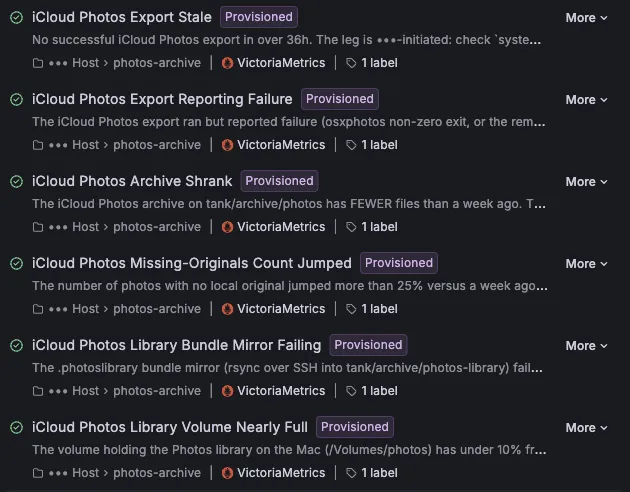
The first full export was 60,058 photos, 551.7 GB, 0 errors. I tested the restore by comparing md5sums of the archive file and the library original.. same bits, not a re-encode. Now a weekly job restores a sample from B2 and verifies the hashes the same way. The checks have already caught real issues: a freshly erased volume had ownership disabled, and the first real run failed on a systemd environment-file parsing error. The failures were reported clearly by metrics (Mac is fine, job is broken).
osxphotos reported 15,464 photos as “missing”.. not an error (exit code 0), not even a log line, just.. gone. All signals green, but that number told me otherwise. I’d been using a clean exit as proof everything landed, but this was proof it hadn’t. All 15,464 were iCloud Shared Album items with no local original to export, so nothing was lost. I was worried that if I switched the Mac to Optimize Mac Storage, I’d get a missing count that looks exactly the same. Now I get an alert if the missing count jumps more than 25% from the week before.
Warning · A clean run can still miss photos
A Shared Album item and a photo that Optimize Mac Storage pushed to the cloud both show up as “missing” in the export report. Only the trend in that count tells them apart, which is why the alert watches the jump and not the exit code.
The strongest objection to this approach is that Apple doesn’t lose photos, so it’s too much machinery for a non-problem. But the risk isn’t Apple’s disks.. sync obeys commands, including deletes, and account/billing failure ignores datacentre redundancy. The machinery is small where it counts: one script runs on the Mac, the server does the rest.
There are real costs, which I accept as trade-offs. A photo created and deleted between two nightly runs will never be captured. The Mac is a single point of extraction; if it’s down, nothing new will arrive until it’s back, but alerts flag that within 1.5 days.
Next up: retiring the old Parachute and Google One route after a full week green.