Reliability & operations · Build log
Every iMessage since 2017, in one archive that only grows
My iMessage archive looked healthy while its history drained out, so I rebuilt it around one database that only grows.
I wanted to turn on Keep 1 Year to reclaim storage on every device, but I didn’t want to lose anything older than a year. So the idea was to capture everything before it aged out and keep it searchable for the long haul.
With Messages in iCloud turned on, this is a global setting across all your devices. So when you switch from Keep Forever to Keep 1 Year, it trims your message history on every device that syncs with iCloud. My message history goes back to 2017, so that’s years of conversations I’d lose across all my devices.
This included attachments and all conversations. v1 was a nightly job on my Mac that copied the Messages database using SQLite’s backup command, copied attachments to my home server, and converted the database to HTML using imessage-exporter. The nightly exports were merged into a single folder that never deleted anything, and imessage-exporter did the heavy lifting of turning Apple’s database into human-readable pages.
Append-only at the file level isn’t append-only at the content level. Every signal looked healthy while history drained out. Each night’s export was rebuilt from a database that by then held only one year, and the merge overwrote the files with the same names, so full-history pages were quietly replaced by one-year versions with no error and no log line.
I discovered this by doing a coverage check against the Messages database from my old 2019 laptop. Only about 12% of my messages from 2017 to 2019 were still in the folder. The result was so far off the design that I suspected the check itself first, but it held up. The weekly snapshot from May on the old server had all of it, and I recovered the missing history from the snapshot that same day. This is a great example of why testing backups with a real restore is so important.
Now the databases are the archive and the HTML is just a view I can rebuild on demand, or whatever format I need at the time.
Now I have a single master database that only ever grows. I can feed it from any Mac or old HTML export, and it keeps track of where every single message came from. I also feed the nightly message count into VictoriaMetrics so I get alerted if it ever drops, and keep an encrypted offsite copy of the archive with restic.
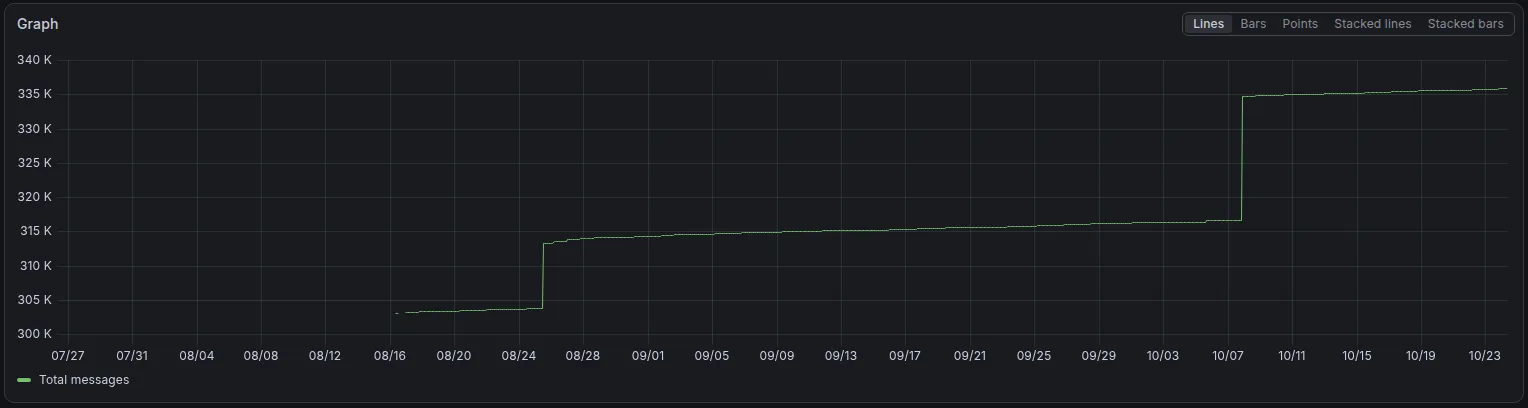
The newest source is The always-on Mac. The first time I pulled from it as a live source, it added 18,111 messages to the archive that the archive didn’t have. It makes me wonder where they were all along.
It seems that the Keep 1 Year trim only reduced the size of the Macs, not purged the older history from iCloud. The evidence is that the always-on Mac (which is still set to Keep Forever) has messages going back to 2017. Now I just need to finish cleaning up the old copies and start building the search on the archive.
Data hoarder mentality for sure, but the historical conversations might be useful in the future (ie finding an old text thread with my late father).
Edited on 2026-10-24 to add the message-count chart, the always-on Mac as a source and the Keep 1 Year/iCloud finding.