Config history for a live Home Assistant
Home Assistant's live config now writes its own history every hour, and the first version reported success while pushing nothing.
HA is already backed up (ZFS snapshots + Backrest, so I can restore everything after a dead disk or a bad upgrade), but backups don’t tell you what changed and when. This gap has been on my list since July, but it became unacceptable once I had leak automation that could close the main water valve. If the automation had behaved differently, I could restore a point in time, replacing the older version, but never see the edits I made.
HA got its own git repo on self-hosted Forgejo. I split it from the home-infra repo. The compose file that runs HA will remain in home-infra, because the service is hosted there, but the project itself lives in its own repo. Moving the compose would mean a new credential and a stack repoint, with no benefit.
The key decision is the direction. Live is the source of truth, so I only sync the live config to the repo, never the other way around. HA rewrites its own YAML through the config API when I make changes in the UI, so the repo is a record, not a deployment. Nothing ever gets applied. I always track an explicit list of the handful of YAML files from the configuration directory.. never a glob. A glob risks accidentally committing a file containing secrets.
An hourly systemd timer runs the sync and pushes a commit if there are changes. I chose auto-commit over an alert waiting for action because a history that depends on someone remembering to run a script isn’t a history. Before copying anything, the script aborts if it finds a literal token or inline password value, but !secret references are allowed. I never track the secrets file or the entire .storage/ directory, so ZFS + Backrest remain the only recovery path.
Clean run, zero commits
The first version of the sync reported a clean run but didn’t commit anything. The problem was a single line where bash’s negation didn’t cover as much as I thought: I read ! as “if adding and committing fails”, but bash applies ! to the single pipeline next to it, not the entire list:
# as written (commit never runs after a successful add):
if ! git add config && git commit ...
# parses as:  (! git add config) && (git commit ...)
# fix: group with braces so the negation covers the whole add+commit
So after a successful add, the negated half was false, and the && short-circuited before it got to git commit. Grouping with braces fixed that. I only caught this because I was checking git log had moved instead of the script’s exit status (which was zero the whole time).
Note · Permanent drift from two bytes
HA writes scenes.yaml as the two bytes [] with no final newline, which the repo’s yamllint -d relaxed pre-commit hook rejects. Fixing only the stored copy would have made the comparison report drift forever, so the sync normalises newlines on both sides before comparing.
When the timer goes quiet
The wrapper pages on sync failure, but a stopped timer never fails, it just goes quiet, and a stale mirror is worse than no mirror at all because it looks authoritative. So each run writes a last-run timestamp as a node-exporter textfile metric, which lands in VictoriaMetrics. A file-provisioned Grafana rule alerts after three hours (three missed hourly runs):
  # 3h = three consecutive missed hourly runs, allowing for the timer's
  # RandomizedDelaySec=5m and a reboot, so a single skipped run is not a page.
  - orgId: 1
    name: home-assistant-config-mirror
    folder: Home Assistant
    interval: 30m
    rules:
      - uid: ha-config-sync-stale
        title: HA config mirror has not synced in 3h
        condition: A
        data:
          - refId: A
            model:
              expr: '(time() - ha_config_sync_last_run_timestamp_seconds > bool 10800) or absent(ha_config_sync_last_run_timestamp_seconds)'
              instant: true
        noDataState: OK
I tested the rule by forcing it to fire, not by watching it stay green. The results: a healthy mirror got me 0, a one-second threshold got me 1, and a bogus metric name got me 1 (via the absent() half). That last one is why I can safely set noDataState: OK.. a vanished metric still pages, but it doesn’t count as no data.
Tip · Force the alert to fire
A healthy mirror gave me 0, a one-second threshold gave me 1, and a bogus metric name gave me 1 (via the absent() half). That absent() is what makes noDataState: OK safe.
The dashboards with no history
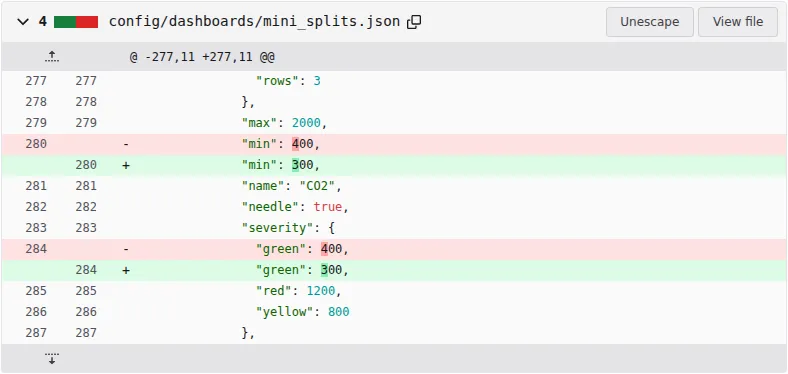
That same afternoon I spent a long time cleaning up entities and dashboards, and doing some registry work like Naming things in Home Assistant. When I was done, the mirror had made zero commits, and the drift check had been reporting “no drift” the whole time (because the dashboards I’d created in the UI are storage-mode dashboards and live in the untracked .storage/). The four with no history were the floorplan, kid’s room, map, and water heater dashboards.
It turns out that quickly fixing this by loosening the .gitignore was the wrong approach: .storage contains plaintext credentials (the auth store with long-lived tokens, and every integration’s config entry). Instead, I’m syncing exports of each dashboard (just the view and card JSON) from the Lovelace API into config/dashboards/. The export lifts the config out of its wrapper and drops the version metadata, so an unrelated HA schema migration isn’t seen as a dashboard edit. It sorts object keys but keeps list order because the view/card order is the content. At the end of the week, I had six dashboards with history, and the drift check caught the one I’d deliberately edited as a test.
Running unattended
The timer ran hourly overnight unattended, zero drift. Every HA session I’ve had since then ended with the repo clean and pushed. It changed how I build things.. new sensors go into tracked YAML instead of UI helpers so they show up in the mirror.
Warning · Reduced, not closed
Entity renames, areas, labels and config entries still live only in .storage, so they have no diff history. ZFS and Backrest can restore them, but they still can’t say what changed.
The other weak spot is commit messages. Auto-generated messages tell you what, not why. For changes that need explaining, I run the sync manually and then git commit --amend to add a real message. So the history of something like the leak automation can say why as well as what.