LG laundry Live Activities (and why I care about wash temperature)
I built iPhone Live Activities for our LG washer and dryer, plus a hot-water prime so the first fill actually runs hot.
The lock screen card shows the current phase of the washer and a countdown to completion (4:13 PM on the first day I checked). No app launch required, and the card persists throughout the entire cycle.
My LG washer + dryer were already in Home Assistant via the native LG ThinQ integration, so I had the cycle data. I chose the native integration over the wideq library because wideq didn’t support real laundry, and the official one gets cloud-pushed updates from LG and exposes all laundry entities.
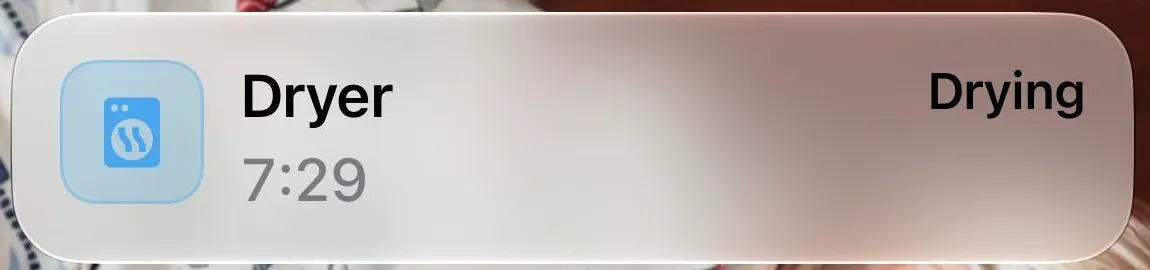
I created one card per machine, leveraging the Live Activities support in Home Assistant Companion app notifications. The card tracks the cycle from start to “Done - unload”. The Washer Done card also includes a reminder to move the load to the dryer. Tapping the card opens the Laundry dashboard in Home Assistant. Only one phone receives the card; the other phone gets a regular notification when the cycle finishes.
Note · One push per state change
Home Assistant sends an update to the card only when the machine’s state changes, never on every tick, because iOS throttles frequent Live Activity pushes and then starts dropping them. The phone counts the time down by itself between updates.
I assumed the finish time was fixed once the LG washer started, so initially I only updated the card when the phase changed. But during the first wash, the washer estimated 45 minutes when powered on, then changed to 149 minutes after weighing the load. So I added a second update type to re-send the card if the finish time differs significantly from the displayed value.
Done means done (eventually)
Getting the card to stick around for five minutes after the cycle and then clear itself required several rounds of fixes. The very first version only showed “Washer” and a 1% progress bar, without any phase. A more interesting bug was that the Done card (intended to last five minutes) vanished after about 30 seconds. It turned out that the washer powers itself off about 30 seconds after finishing, and Home Assistant was treating that power-off as a new state change, cancelling the Done card mid-wait. I hadn’t accounted for the machine doing anything after the cycle ended. So I learned to ignore the power-off immediately after cycle end, and now the Done card lasts a full five minutes.
Tip · Power-off cancels Done card
The washer turns itself off about 30 seconds after it’s Done. Home Assistant sees this as a new state change and cancels the Done card. We need to ignore the power off immediately after a cycle ends.
The stranger bug was when the card counted up four hours and survived two attempts to clear it manually. It turned out that when I pushed twice in less than a minute, each push created a new card. Home Assistant stores one token per card, so the first card got orphaned.. I couldn’t update it or end it. How do you clear a card nothing references? Turns out: you don’t. You prevent it from being created in the first place. Now every push is delayed for longer, so that if I make a burst of changes, only the final state ever makes it to the phone.
Tip · Rapid pushes orphan cards
If I push twice in less than a minute, it will create a new card for each push. Home Assistant only stores one token per card, so there is no way to update or end the first card. Delay every push so that only the final state makes it to the phone.
The hot-water prime
The part I’m proudest of has nothing to do with the phone. The washer wants hot water for the first fill, then cold water for rinses. But the hot and cold lines are bridged under the far fixture, so the recirculation pump running also warms the cold line, which the rinses draw from.
So when the washer is powered on, Home Assistant presses the water heater’s hot button once, forcing a single recirculation cycle. It waits for the cycle to end, turns recirculation off, and holds off until the wash ends, at which point it releases and recirculation returns to its normal schedule. The first time I ran a real wash, the outlet temperature rose from 114.8 to 125.6 °F in about a minute, and the water going into the first fill was 126 to 129 °F.
Wash temperature is important for color protection, whitening when it matters, stain treatment of certain types of stains (hot on some types of untreated stains may set the stain), and surfactant & enzyme performance.
Tip · LG hides the temperature setting
LG doesn’t expose the wash temperature setting to Home Assistant, so it can’t tell a cold-only cycle from a hot one, and a cold wash still gets the priming minute. And if the house empties and someone comes home during a wash, recirculation can resume, so one rinse may run warm.
Priming the washer is just one piece of a larger project I have around the water heater and recirculation loop. I’ll talk about the rest of the setup in my next post: Hot water at the tap with Home Assistant.