Class-only SVGs that render everywhere
The diagrams on this site are SVGs with no colors or fonts. The site themes them, Obsidian renders them on my phone, and a shared lint keeps both honest.
So I like to write myself.. this blog, books, my own notes, but I’m increasingly leveraging AI to author and maintain diagrams. The AI follows my ten-class contract and the lint I set up. I can pass in hand-drawn diagrams or text-based descriptions and have simple, effective, lightweight but impactful diagrams produced. I think these fit the web very well, they render cleanly in Obsidian, and I can version control them in ADRs (the ones that deserve a release cycle) and otherwise.
That only works if the diagram is markup, not a picture. So every diagram on this site is an SVG which contains no colors, no fonts, nothing. The site styles it, it’s git versioned, and lint checked in CI just like any other code.
This is new to me and frankly an experiment!
Note: Mermaid has always had a place in Markdown based authoring and last couple years a big uprising in usage since agents write and consume it very well and efficiently. Now that I have my agents writing diagrams for me, I’ve shifted to SVG.
The problem with pictures
Export an SVG from drawing tools and you get the fill, stroke and font-family baked in as presentation attributes on every elements. Looks great.. Then the site maybe gets a dark mode and you’ve got near-black lines on a near-black page, or you redesign and every old diagram is still wearing the old theme.
You can’t fix that from inside the file very well either. Presentation attributes can’t take CSS variables, so a hardcoded #1a1a1a can’t follow the theme tokens. And an SVG loaded via <img> is its own document which can’t see the page’s CSS, so even currentColor resolves against nothing useful. The SVG 2 styling chapter is a fun read if you want to go down the full cascade rabbit hole.
So this site (built with Astro) inlines each diagram at build time, with a little plugin in the Astro Markdown pipeline that swaps the embedded file for its <svg> markup, wraps it in a <figure>, and turns the alt text into the SVG’s <title> if the file doesn’t have one (so screen readers get a real description). Once it’s inline, it’s just part of the page, and page CSS reaches it. It took a few back and forths with Claude Code to nail down the experience I wanted for generation but I’m pleased with the results.
Classes only
The contract is ten classes, and they’re the only thing a diagram gets to say about how it looks.
dg             # on the root <svg>
dg-box         # a node
dg-box-accent  # the node the paragraph is about
dg-muted       # a background node
dg-group       # a boundary around nodes
dg-line        # connectors
dg-arrow       # arrowheads
dg-label       # text
dg-label-sm    # smaller text
dg-set         # a Venn set
No style attributes, no fill, stroke, or font-* anywhere in the file (with one exception, a fixed <style> block, more on that below). A box and its label look like this:
<rect class="dg-box-accent" x="136" y="8" width="208" height="48" rx="4"/>
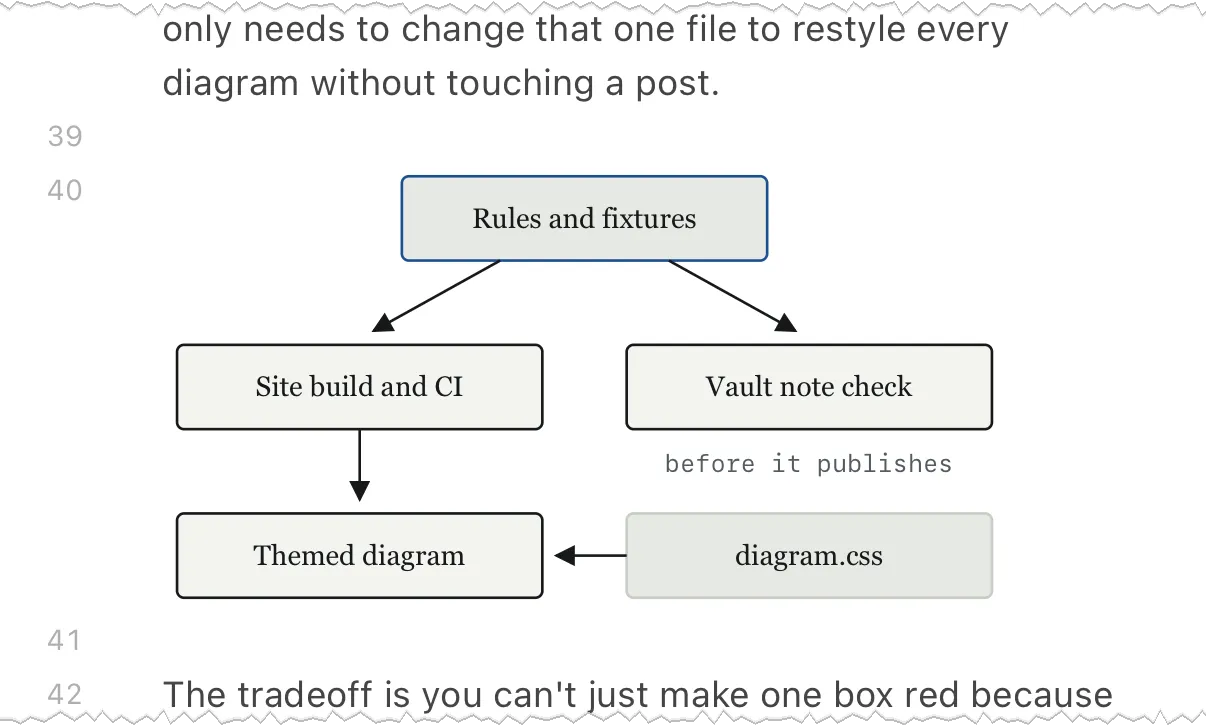
<text class="dg-label" x="240" y="37" text-anchor="middle">Rules and fixtures</text>
diagram.css is the only place those classes get hooked up to the theme tokens (dg-box gets the paper fill + ink stroke, dg-set gets the accent at low opacity, etc) and each diagram file gets a copy of it, with a test keeping it in sync. Dark mode just follows the tokens, and if I ever redesign, one file and every diagram is restyled without touching a post.
The tradeoff is you can’t just make one box red because it feels important that day. There’s one accent class and the style guide says to use it on at most one or two nodes. For small explanatory diagrams that constraint is the point (it keeps them from turning into slide art).
Rendering outside the site
Obsidian doesn’t inline anything, it just shows ![[x.svg]] as an <img /> which hits the same limitation as above: page CSS can’t reach inside the image. On my iPhone, every class-only diagram came out as black boxes with black-on-black labels, and the connector lines were invisible.
So every diagram file has this one fixed <style> block which is diagram.css with the light/dark token values written out, plus system fonts (obviously an image can’t load the site’s web fonts). It sits right after the <title> in every file, the same bytes each time:
<svg class="dg" role="img" viewBox="0 0 480 160" xmlns="http://www.w3.org/2000/svg">
  <title>One rules file and its fixtures feed two checks</title>
  <style>.dg-box{fill:#f3f4f0;stroke:#17191b;stroke-width:1.5}…@media (prefers-color-scheme:dark){.dg-box{fill:#141719;stroke:#e0e3dd}…}</style>
  …
</svg>
The image picks up Obsidian’s theme rather than the phone’s theme (my iPhone is in dark mode but Obsidian was in light, and I got the light version), so the diagram doesn’t need to carry its own background.
The site build strips the block before inlining, so pages still use diagram.css alone. Each file pays ~850 bytes of repeated CSS for it. If the theme changes I update the block and find-and-replace it in the files, which is rare.
This is the first diagram as Obsidian renders it on my iPhone with the block in place.
Linted like code
The rules are in one versioned file (svg-lint.rules.json) which only contains data and parameters, so the site build and the vault check read from the same list. A trimmed excerpt:
{
  "version": 3,
  "viewBoxWidth": 480,
  "maxBytes": 20480,
  …
  "forbiddenAttrs": ["style", "fill", "stroke", …, "xlink:href"],
  …
  "classVocabulary": ["dg", "dg-box", "dg-box-accent", …, "dg-set"],
  …
}
xlink:href is on the forbidden list because Inkscape and most editors still write it. There’s a fixtures directory of passing and failing SVGs (each failing fixture named after the rule it breaks), and the site build runs the lint on every diagram (inline or embedded), with a failure naming the file and the rule. The lint requires the fallback block byte-for-byte right after </title> (and forbids it in inline SVG), and a drift test fails if the block stops matching diagram.css and tokens.css.
The cool part is there’s a second copy of the lint, in Python, that checks the note in my vault before it publishes through Enveloppe. Since both run every test fixture.. any drift becomes a failing test on both sides.
Checking what the picture looks like
Element and attribute checks tell you a diagram is clean, not that it’s readable (two diagrams passed the old lint and were unreadable), so the lint’s layout rules (v2, now merged) look at the picture itself.
An arrowhead drawn as its own loose shape fails the build:
<line class="dg-line" x1="96" y1="32" x2="200" y2="32"/>
<polygon class="dg-arrow" points="200,24 216,32 200,40"/>
The same arrow passes when the line points at a <marker> with marker-end:
<defs>
  <marker id="arrow" markerWidth="8" markerHeight="8" refX="7" refY="4" orient="auto">
    <path class="dg-arrow" d="M0,0 L8,4 L0,8 Z"/>
  </marker>
</defs>
<line class="dg-line" x1="96" y1="32" x2="208" y2="32" marker-end="url(#arrow)"/>
A marker-end pointing at a marker that isn’t in the file fails, as does text outside of the viewBox, and a label centered in a box without text-anchor="middle".
Other things only warn, like an estimated label width (chars * font-size * 0.6) overflowing its box or the canvas, a corner radius other than 4, or rect and circle geometry off the 8-unit grid. Lines and text are exempt from the grid (connectors meet box centers, labels sit on baselines).
A problem fails the build on a live post but only warns on a future-dated one (so one broken draft doesn’t hold up other posts), and CI fails on warnings, so I get alerted when the post merges, days before its go-live build would break.
It’s just a text width estimate and a few coordinate checks, the same move as a type checker, turning “looks off to me” into a rule with a failing example. That matters more now that AI is authoring and maintaining a lot of this stuff, since “make it look nice” is a vague target for a model and a rules file with passing/failing fixtures is one CI can check.
The lint only checks the “how” of the diagram. The “what” is still captured by the first question on the style guide checklist: does it say something the prose can’t? If not, the diagram is dropped.